
My OldBoy! - GBC Emulator
Pixel Respawn LLCArcade
4.1968.00 Reviews
- Version
- Varies With Device
- Installs
- 500.00K
- Age Rating
- Everyone
Screenshots
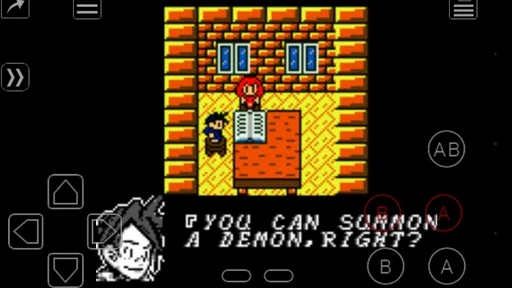
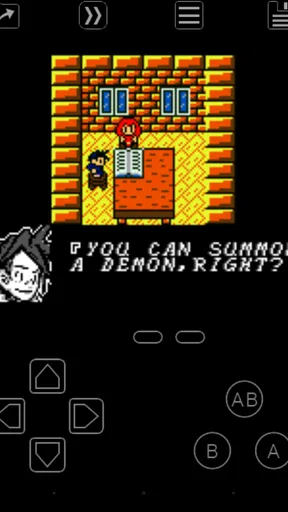
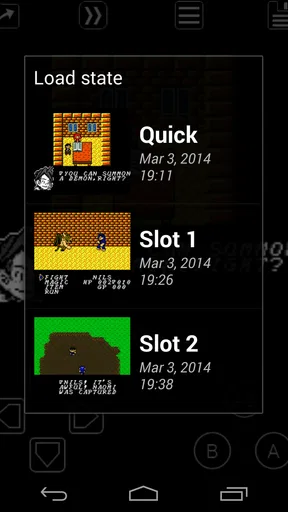
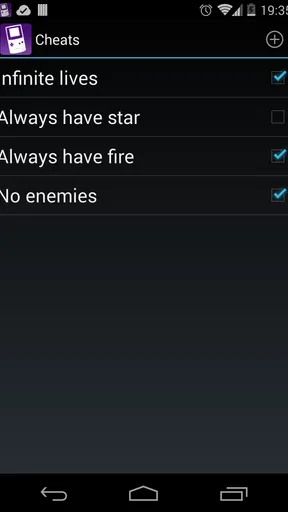
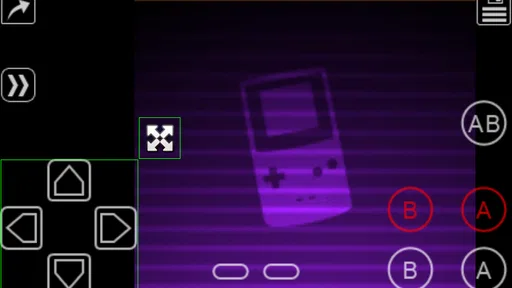
Our Review of My OldBoy! - GBC Emulator
 Analysis by Appyee
I approach My OldBoy! - GBC Emulator less like a game with a campaign of its own and more like a way to revisit the goals built into Game Boy and Game Boy Color titles. That distinction matters: the emulator gives you tools for playing, but the reasons to keep going come from whichever game you load. For me, it works best when I already know what I want to play and want a practical way to pick it up in short bursts.
What keeps a session moving
Classic handheld games often make their next objective easy to understand: reach the next room, finish a puzzle, win a battle, or improve a run. My OldBoy! doesn’t add quests or unlocks around those goals, and I wouldn’t expect it to. Its job is to make those original play loops accessible on a phone, with the on-screen controls and emulation features serving the game rather than competing with it.
That changes how I judge its pacing. A quick puzzle or a familiar level can fit into a spare moment, while a longer role-playing adventure may be easier to enjoy when you can give it more attention. If I’m choosing a game for a commute or a short break, I’d favor something with clear stopping points; for a story-heavy game, I’d want to make sure I can keep track of where I left off.
Progress comes from the game you choose
There’s no single progression track shared across everything this emulator can run. Your sense of progress depends on the original game’s save design, milestones, and difficulty. That variety is part of the appeal, but it also means the app cannot make a slow or confusing game feel more rewarding just by loading it. I’d choose a title whose basic goals still sound fun before spending time setting up a large library.
For a practical routine, I’d keep a small selection of games ready rather than constantly switching between many files. One can be an easy-to-resume game for brief sessions, while another can be a longer adventure. That simple split makes it easier to find something that fits your available time and avoids turning the emulator into a library-management project.
Difficulty, comfort, and the temptation to use cheats
The emulator’s cheat-code support gives you an option when a tough section stops being fun, but I’d treat it as a personal adjustment rather than a built-in difficulty system. A code can help you revisit a game without repeating a frustrating stretch; it can also flatten the challenge and make a hard-won victory feel less satisfying. I’d try the original challenge first, then decide whether a shortcut helps me enjoy the game more.
Comfort is another part of the difficulty curve. The customizable on-screen buttons let you adjust their size and layout, which is useful when a game asks for precise or frequent inputs. I’d take a moment to arrange the controls before judging a game’s responsiveness. Touch controls still don’t provide the physical feedback of a handheld’s buttons, so players who depend on tactile input may prefer dedicated hardware or a suitable controller.
Who will stick with it?
My OldBoy! is most appealing if you already have a particular Game Boy or Game Boy Color game in mind, enjoy revisiting older play styles, and are comfortable bringing your own game files. It is less compelling if you expect a packaged set of games, a new story, or achievements and unlocks supplied by the emulator. The games themselves provide the goals; the app provides the means to play them.
For an everyday example, I could load a puzzle game before heading out, play a few rounds while waiting, then switch to a longer adventure at home. Link cable emulation over Bluetooth or Wi-Fi is a different kind of use: it can bring back compatible multiplayer activities such as trading or battling, but it makes most sense when another player is available and both of you have the relevant game ready. It isn’t a substitute for a solo progression system.
Compared with playing on original hardware, the phone is easier to carry and offers flexible touch controls, but it doesn’t recreate the feel of real buttons. Compared with a general-purpose emulator, this one is focused on Game Boy and Game Boy Color rather than being a hub for many console families. I’d choose it for that focused return to those handheld libraries; I’d look elsewhere if I wanted one app for a broad range of systems or a ready-made collection.
A pocket-sized return to handheld gaming
Remember those chunky cartridges and the tiny screen of your old Game Boy Color? My OldBoy! brings all that back, but this time, it fits right in your pocket. The app is designed to emulate the classic console on your Android or iOS device, and it does so with surprising accuracy. You can play all your favorite classic games without the need for the original hardware.
Getting started with My OldBoy! is as easy as pie. You just need to load your ROM files into the app, and you’re good to go. Now, I know what you’re thinking: "But where do I get these ROMs?" Well, that’s a journey you’ll have to embark on by yourself, but once you have them, the emulator runs them smoothly.
Features That Stand Out
One of the coolest things about My OldBoy! - GBC Emulator is its wide range of features. First off, it offers fast emulation. This means no lagging or stuttering, so you can jump over every Mario obstacle or catch every Pokémon without any hiccups.
The app also supports link cable emulation over Bluetooth or Wi-Fi, which is a game-changer. You can trade Pokémon or battle your friends just like the good old days. Plus, the app supports cheat codes if you’re in the mood for a bit of a power trip!
Another feature worth mentioning is the customizable controls. You can adjust the layout and size of the on-screen buttons to fit your personal preference, which is pretty neat. Nobody wants crammed thumbs during an intense gaming session.
Graphics and Sound
Okay, let’s talk about graphics. Obviously, we’re dealing with games from the late '90s, so don’t expect 4K resolution. However, My OldBoy! does an excellent job of replicating the original look and feel. The colors are vibrant, and the pixels are just as charming as you remember.
The sound emulation is also spot-on. From the iconic Mario theme to the simple bleeps and bloops of Tetris, the audio takes you right back to your childhood. It’s like having a mini orchestra in your pocket, playing all your favorite tunes from yesteryears.
Battery Usage and Performance
Now, on to something every smartphone user worries about—battery life. Thankfully, My OldBoy! is pretty light on resources. I found that even after a couple of hours of gaming, the battery drain was minimal. The app runs efficiently, making it perfect for long gaming sessions on the go.
Performance-wise, this emulator is a beast. I didn’t experience any crashes or major bugs during my time with it. It’s stable, reliable, and does what it’s supposed to do without any fuss.
Price, fit, and lasting appeal
Pixel Respawn LLC’s arcade-category app costs $3.99, so I’d treat it as a focused utility purchase rather than a library of games. It has an Everyone age rating, and its average rating is 3.9 from around 8.6 thousand ratings, with about 965 written reviews and over 500 thousand installs. Those figures suggest a sizable audience, but they don’t tell me whether it will suit your preferred games or control style.
Because you bring the ROM files, the real value depends on what you already own or can legally use. Before buying, I’d make sure the games I want to revisit are available to me and that I’m comfortable loading files onto my device. That small bit of preparation avoids paying for an emulator and then discovering I have nothing ready to play. The app was released on March 3, 2014, and its appeal is tied to a specific, well-established generation of handheld games rather than a changing stream of new content.
One useful habit is to test a short section of a game after loading it, then adjust the button layout before settling in. A layout that feels fine for menu navigation may be awkward for a platform game that needs quick jumps, while a puzzle game may be comfortable with a simpler arrangement. I’d also keep a backup of important game files and saves using a method I trust; phone changes and file moves are easier to handle when I’m not relying on a single copy.
Link play deserves a little planning too. If I wanted to trade or battle with someone, I’d arrange the session in advance and check that both players have a compatible game ready, rather than assuming the emulator supplies an opponent or matchmaking. That makes the feature a nice way to recreate a specific shared activity, not something that automatically adds social play to every title.
Wrapping Up
In conclusion, My OldBoy! - GBC Emulator is a must-have for anyone looking to relive the magic of Game Boy Color games. It’s easy to use, packed with features, and brings a hefty dose of nostalgia. Whether you’re a seasoned gamer or just someone looking to revisit childhood memories, this app delivers.
If you’re ready to dive back into the world of classic gaming, you can find My OldBoy! on the Play Store or App Store. Just load up your favorite ROMs and let the nostalgia begin!
Verdict
Strengths of My OldBoy! - GBC Emulator
- Smooth gameplay with minimal lag.
- Customizable controls for user comfort.
- Supports cheat codes for enhanced play.
- Battery-friendly for extended sessions.
- Saves and loads game states easily.
Limitations of My OldBoy! - GBC Emulator
- Limited ROM compatibility.
- No built-in game library.
- Ads in free version can be intrusive.
- Some features locked behind paywall.
- Occasional audio glitches.
Other Releases by Pixel Respawn LLC
View All
My Boy! - GBA Emulator
Arcade4.1
Similar Picks in This Category
View All
Subway Surfers
SYBO Games4.6

Stickman Party 234 MiniGames
PlayMax Game Studio4.6

Subway Princess Runner
Ivy4.4

Temple Run
Imangi Studios4.2

Zombie Tsunami
Mobigame SAS4.6

Stack Ball - Crash Platforms
CASUAL AZUR GAMES4.5
Frequently Asked Questions
What features does My OldBoy! - GBC Emulator offer?
My OldBoy! - GBC Emulator is packed with features that enhance your gaming experience. It supports fast forward to skip slow sections, and offers save states to preserve your progress. The app also provides link cable emulation via Bluetooth or Wi-Fi, customizable layout, and cheat code support to unlock additional game features.
Is My OldBoy! - GBC Emulator easy to use for beginners?
Yes, My OldBoy! is designed with user-friendliness in mind. The interface is intuitive, making it accessible for both beginners and experienced users. The app includes helpful features like an easy-to-navigate menu and step-by-step instructions for setting up your games, ensuring a smooth experience for everyone.
Are there any compatibility issues with My OldBoy! - GBC Emulator?
My OldBoy! is highly compatible with a wide range of GBC games and runs smoothly on most Android devices. However, for optimal performance, it is recommended to use a device with decent processing power. Always check for updates, as the developers frequently release optimizations and bug fixes.
Does My OldBoy! - GBC Emulator support multiplayer gaming?
Yes, My OldBoy! supports multiplayer gaming through its link cable emulation feature, which can be utilized via Bluetooth or Wi-Fi. This allows you to connect with friends and enjoy multiplayer games just like on the original Game Boy Color, providing an authentic and fun gaming experience.
Is My OldBoy! - GBC Emulator a paid app or free to use?
My OldBoy! offers both free and paid versions. The free version provides essential features for casual gaming, while the paid version unlocks additional options such as fast-forwarding, no ads, and more. Purchasing the paid version supports the developers and enhances your overall gaming experience.
Play our best games!


